Model Overview
If you do not see the Model page, enable Advanced View from the Setting page.
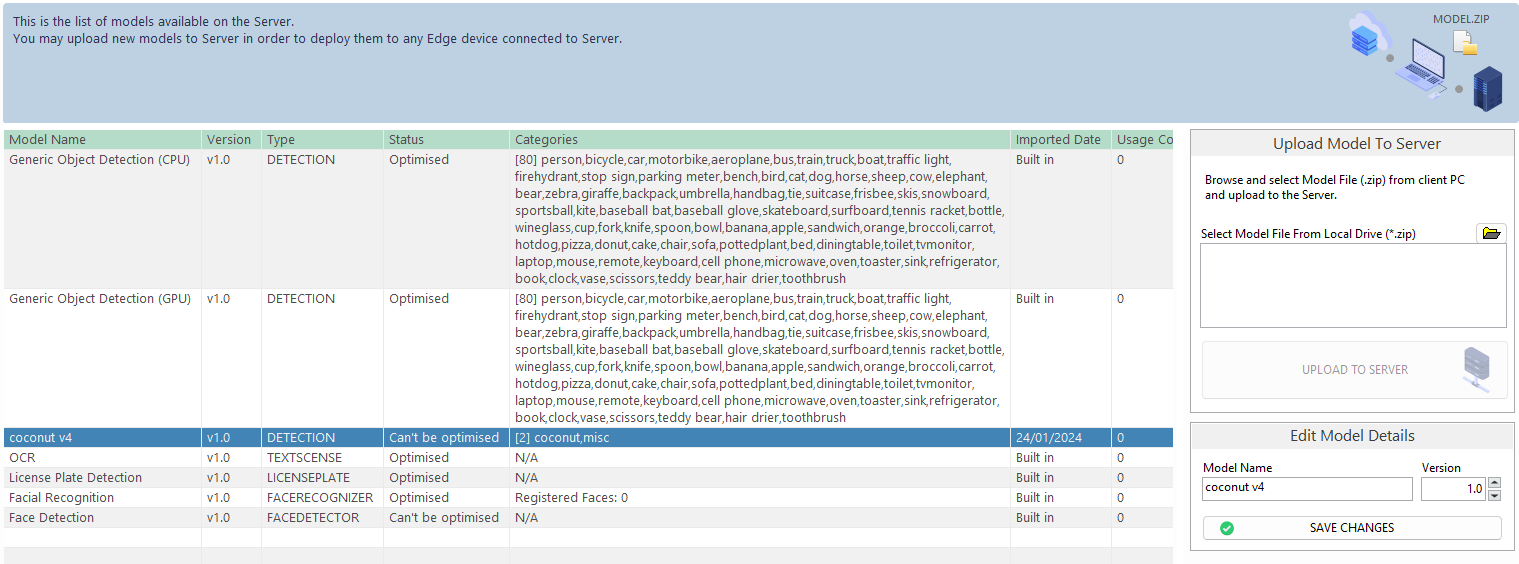
The Model page allows you to manage models in ANSVIS Server. These models can be used for custom AI tasks.
Supported Model Formats
ANSVIS supports the following model formats:
| Model format | File type | Target hardware or runtime |
|---|---|---|
| ONNX | .onnx | Intel and NVIDIA GPU |
| OpenVINO | .xml and .bin | Intel |
| TensorRT | .engine | NVIDIA |
| C++ Runtime-compatible models | C++ Runtime |
Model Optimization
When a model is launched for the first time, ANSVIS may take some time to optimize it for your hardware.
| Status | Description |
|---|---|
Unknown | The server is checking the model status. |
Not optimized | The model is waiting for optimization. |
Being optimized | The model is being optimized. |
Optimized | The model is optimized. AI tasks can run only when the related models are optimized. |
Can't be optimized | The model cannot be optimized for the current hardware, but it can still be used. Performance may be reduced. |
Failed optimization | Model optimization failed. This can be caused by a corrupted engine. A clean reinstallation may be required. |
ANSVIS Server optimizes one model at a time. In most cases, you will see only one model with the Being optimized status, while other models wait for their optimization turn.
Built-in Models
ANSVIS provides several built-in models. Built-in models can be identified by the built-in imported date.
Examples include:
- VehicleDetection
- FireDetection
- Facial Recognition
- License Plate Recognition
- GenericOD
Refer to the model pages in this section to learn more about ANSVIS built-in models.
Uploaded Models
You can upload new models to ANSVIS Server. Uploaded models usually fall into one of these types:
| Model type | Description |
|---|---|
| ANSTS Models | ANS Training Studio (ANSTS) allows users to train custom computer vision models, such as classification and object detection models, and import them directly into ANSVIS. |
| ANSVIS Custom Models | ANSVIS Custom Function offers a structured framework for designing custom analytic functions, models, or pipelines to integrate and execute within the ANSVIS Server environment, using OpenCV 4.10. |
| Third-party Models | Models from other sources can be integrated into ANSVIS as long as they are compatible with a C++ runtime environment. For model conversion guidance and integration support, please contact us. |
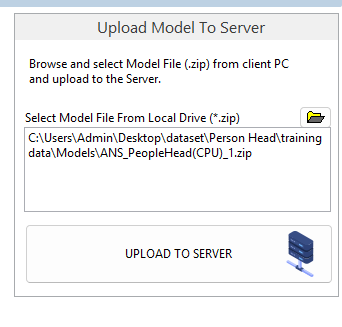
To upload a model:
- Browse to the model location and select the model file.
- Click
Upload to Server.
Model Accuracy, Score, and Sensitivity
Model accuracy is the performance of the model under testing conditions. It represents the model's capability, but does not guarantee the same detection rate in real deployment. Actual results may vary depending on factors such as camera view, lighting, weather, object size, and background conditions. Users can fine-tune Model Score and Sensitivity settings to optimize detection performance for their specific deployment scenario.
When creating AI tasks, you can adjust model score (and/or sensitivity for some models).
| Term | Description |
|---|---|
| Model score | The minimum confidence required for ANSVIS to accept a detection. Think of it as the "acceptance threshold" for detections. Example: The model detects a person and estimates that it is 85% confident. If the Model Score threshold is set to 90%, the detection will be rejected. If the threshold is set to 80%, the detection will be accepted. |
| Model sensitivity | Controls how actively the model searches for possible objects. Higher sensitivity encourages the model to consider more potential detections, while lower sensitivity makes it more selective. Example: In a crowded scene, increasing Sensitivity may help the model find partially visible people that might otherwise be missed. However, it may also increase the chance of detecting non-person objects by mistake.. |